
the workspace
Terminals on an infinite plane.
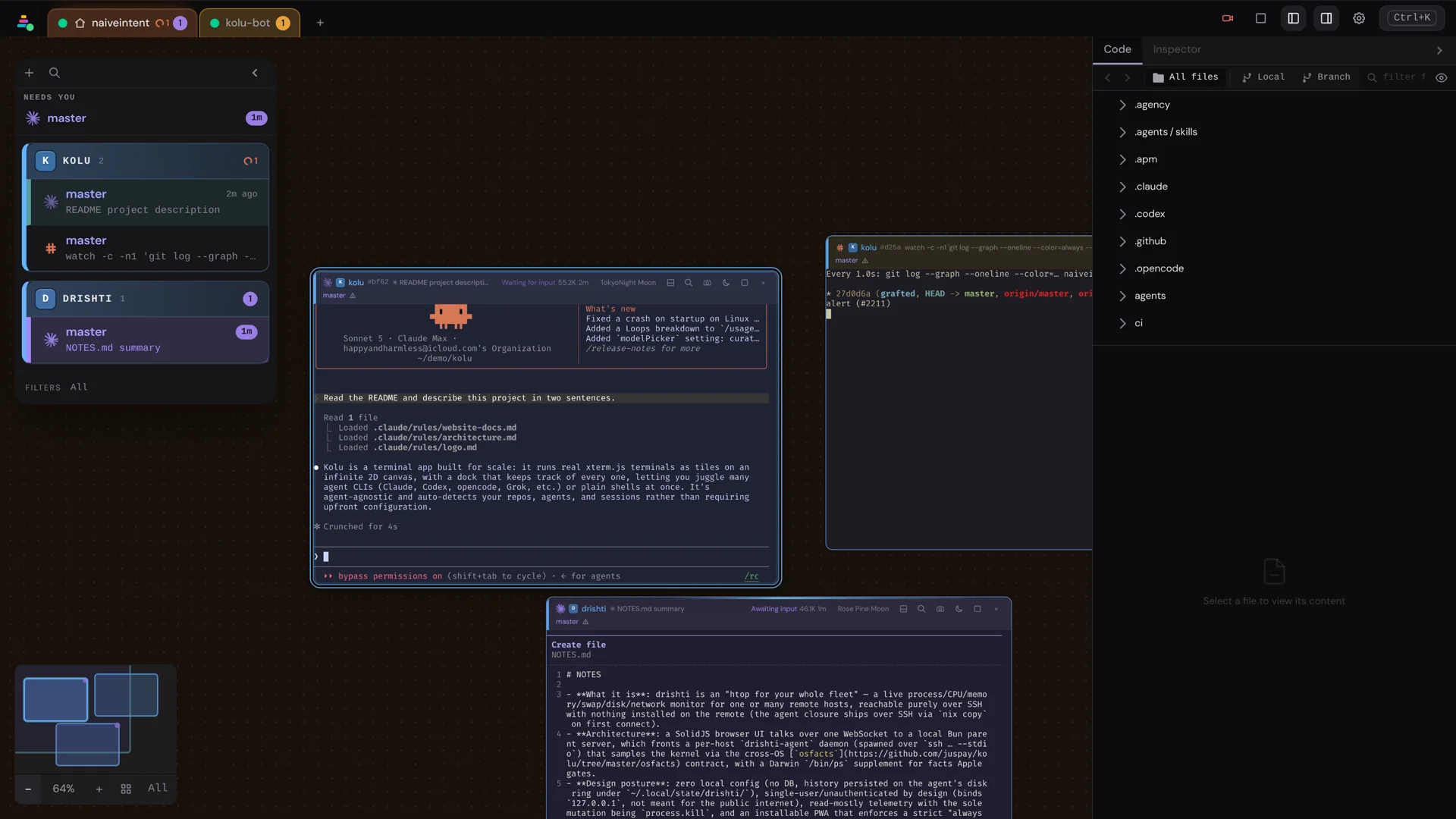
The desktop workspace is an infinite, mode-less 2D plane. Terminals are tiles you arrange freely — spread them out like Figma or Excalidraw, cluster them by repo, or maximize one and cycle. There is no separate edit mode: the canvas is always live.
Moving around
- Pan with two-finger scroll; hold Shift to force pan even when the cursor is over a tile.
- Zoom with pinch or Ctrl + scroll. Text selection, link hovering, and mouse input forwarded to TUI apps all land on the cell under your cursor at any zoom level.
- Tiles snap to a 24px grid on drag and resize.
Opening terminals in place
- Double-click any empty spot on the canvas to open the command palette
pre-drilled into the New terminal group — the same menu the dock’s
+button reaches, so you can pick a repo, name a worktree, or start in the current directory without leaving the plane. - A new tile opens at the size of the terminal you’re currently in — the active one, not whichever was created last — so a layout you’ve tuned carries forward. Only the size carries over, not where the tile lands.
Maximize
Double-click a tile’s title bar to maximize it. That posture persists across reloads, and switching terminals while maximized — from the dock, Cmd/Ctrl + 1…9, or cycling — is a pure show/hide: no reflow, no repaint, no shell resize.
Arranging
Run Arrange canvas by repo from the palette to cluster each repo’s tiles into an island.
Agent state as motion
Each live tile wears its agent’s run-state as motion on its border, in the tile’s repo color:
- Working — same double frame as the active tile (solid border + outer moat), with the outer rail carrying a calm rotating highlight (busy, asks nothing).
- Needs you — a comet sweeps the ring (faster the fresher the wait); a missed alert throbs louder still.
- Just finished — a one-shot exhale softens into a dim held ring, so a post-turn lull never reads as “blocked on you.”
- Idle — no glow.
prefers-reduced-motion collapses every aura to a static ring (finished keeps
the soft hold, without the pulse).
Place on the plane
New tiles land with a short brightness settle so opening a terminal feels like putting something down, not a hard pop. Sleeping tiles fold — slightly desaturated and dimmed — so dormancy is visible from the canvas, not only the title bar. The dotted floor and host-hue wash stay as quiet room cues.
The minimap
The minimap in the corner is both overview and heatmap: it marks tiles whose agents are waiting or thinking, tints each rect with a touch of repo colour so small tiles stay distinguishable, and carries the zoom / arrange / activity-window controls. The bigger multi-agent workflow lives in Power Features.