
never miss a turn
The agent that needs you, reaches you.
Running several agents, the thing you most need to know is which one is waiting on you, and where. kolu escalates that signal outward — from the dock row, to the app icon, to an OS notification, across every machine — so an agent that flips to awaiting you finds you even when you’re looking elsewhere.
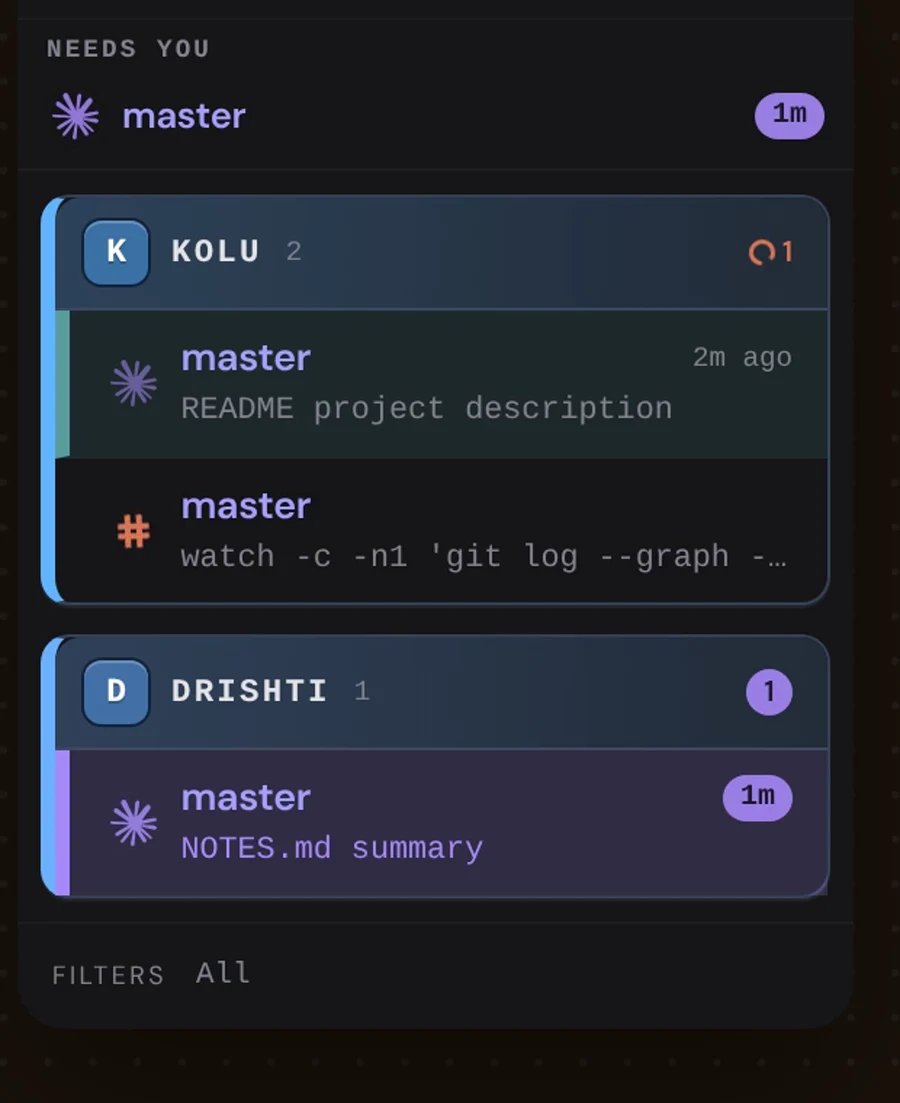
One vocabulary, everywhere
Three signals, three colours, and the same rendering wherever they appear — dock row, repo section header, host tab, phone host row (one exception, below the table: a host tab shows active as a running stripe):
| Signal | Looks like | Goes away when |
|---|---|---|
| Needs you — an agent is blocked on your input | violet count pill · violet row wash · a chip counting how long it has waited | you answer it — nothing else clears it |
| Unread — an agent finished and you haven’t looked | amber count pill · amber row wash · amber badge on the pip | you open that terminal — or that agent starts working again (or the terminal closes) |
| Active — something is happening in a terminal | a plain rust count with a spinner · on a host tab, a rust stripe runs along its bottom edge | everything goes quiet |
The two you can act on wear a pill; the activity count deliberately does not. So a number in a pill always means there is something to do here. Where kolu has somewhere to send you, clicking a pill takes you there — the violet count jumps to the next terminal blocked on you, cycling through them on repeat clicks. Clicking never dismisses: the needs-you count is a live reading of what is actually waiting, so only answering the agent clears it. (A host tab’s amber count has no jump of its own — switching to that machine is what clears it, and the tab is already the button that does that.)
A host tab carries no active count of its own. A number that appeared and vanished as agents started and stopped made the tab grow and shrink, shoving every tab after it sideways. Instead a thin rust stripe runs along the tab’s bottom edge while anything on that machine is active, and the tab keeps its size. The count itself is the working row in the popover the connection dot opens (screen readers get it in the dot’s label). With reduced motion on, the stripe stops moving but stays on the tab.
“Active” means what the marks mean. The rust count is the same question a moving mark answers, asked about a whole machine or a whole repo — so it counts an agent thinking, an agent still settling in the moments after its turn, and a plain shell that is printing. That last one matters: a terminal running a build has no agent to ask, and its output is the only evidence there is. If three marks are moving, the count above them says three.
One consequence worth knowing: a terminal that prints intermittently — a dev server logging a line every few seconds — counts while it prints and stops counting a second after it goes quiet, so the number pulses. It is doing exactly what the mark in the dock does, at the same moment, because both read the same signal. A count that held steady while the marks beneath it blinked would be the older, worse behaviour wearing a calmer face.
An agent that finishes in the background washes its whole dock row amber — tinted background, lit leading stripe, bold title. A blocked one washes violet and gets a mirrored entry in the dock’s pinned Needs-you strip — the row itself does not move. The vocabulary of states is Agent detection; how the marks compose with the state pip is The Dock.
Beyond the app
- The app-icon badge counts awaiting agents — and it counts them across every connected machine, not just the one on screen.
- A backgrounded tab gets a native OS notification when an agent effectively finishes (its turn is done and the terminal has been quiet for a few seconds — so background sub-agents still typing do not chime early; once that finished signal has fired, idle statusline ticks do not re-chime), starts waiting on you, or stops to ask you something — a live question or permission prompt reaches you even when the agent was already sitting in its post-turn lull, and usually reads needs your input rather than finished (a prompt that settles in right on the heels of a finished turn may still carry the finished wording — but it rings). (If notifications don’t appear, see Troubleshooting.)
- Clicking the notification brings kolu forward, and when the agent is on another machine it switches to that host and focuses the exact terminal — one action, no hunting.
Attention alerts is the master switch for reaching you this way. It’s a toggle in the settings popover, and turning it off silences the chime, the OS notification, and the dock’s unread mark for a background tile — the app-icon badge, the counts, and the row washes are a live reading of what is actually waiting, so they stay. kolu remembers the setting for this install and an upgrade keeps it, however old your install is.
Across machines
The needs-you signal is a first-class part of the multi-host story, and it reaches you the same way on every host — an agent that finishes or starts waiting on a background machine chimes, shows a backgrounded-tab popup, and marks that host, exactly as the active machine’s does. Each host tab carries the full summary for that machine — how many terminals have something happening in them, how many agents are blocked on you, and how much finished work you haven’t opened — read straight off it (a host whose link drops dims its tab rather than dropping the counts). A tab with an agent waiting on you washes violet; one with unopened finished work washes amber until you switch there.
The summary shows on the tab you’re already on, too. Being on a machine is no guarantee you can see a terminal buried in the dock — so the tab tells you what that host holds regardless, and clicking its violet pill takes you straight to the agent that’s waiting. On a phone, the same three counts ride the host row in the pull-down sheet — see kolu on a phone.