
the navigator
Every terminal, at a glance.
The dock is the canonical live-terminal navigator down the left edge of the canvas. Where the canvas is spatial — tiles wherever you dragged them — the dock is a single ordered list, so a glance answers “what do I have open, and which one needs me?” without hunting across the plane.
Two levels of detail
The dock has two densities. Rail is a narrow strip of one chip per terminal.
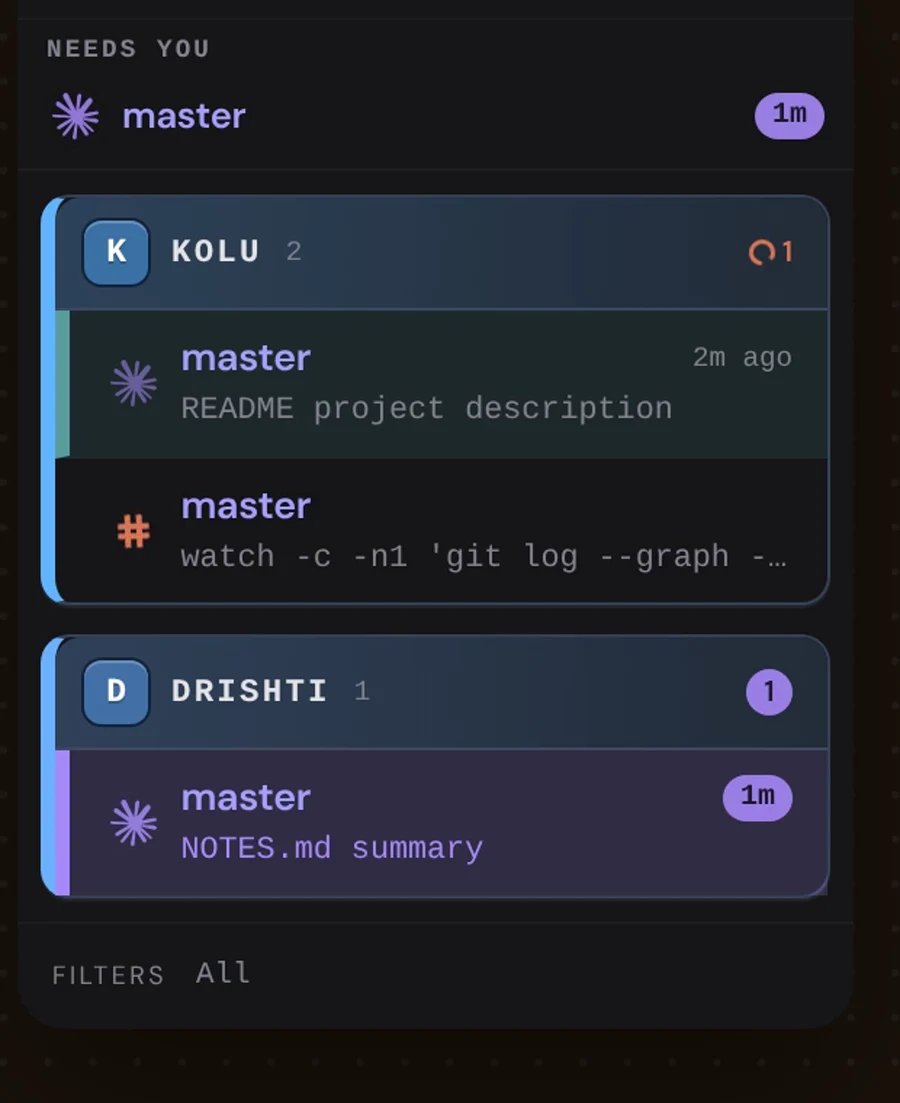
Cards (the default) groups rows by repo, each row reading
indicator · branch · pips · time. Toggle between them with
Cmd/Ctrl + Shift + B.
A cards row is two lines. The first is the identity line above. The second says
what that terminal is doing right now — an agent’s own summary, or the live
phase when it has not given one (Running tools, Awaiting input), or the
foreground command in a plain shell — and, at its right end, the model that
agent is running on when it reports one. So a fleet spread across several models
reads without opening the right panel: the status word answers doing what, the
model beside it answers on what.
Rows are grouped by repo, and each repo is a card: a continuous repo-coloured spine down its left edge, a solid monogram tile (first letter of the repo) plus the uppercase name on a tinted header that stays pinned while you scroll that repo’s rows, and a little air between cards so a busy fleet stays scannable. Which repo a terminal belongs to is obvious without reading a label that has scrolled away. Per-branch row colours still tell branches apart within a repo.
In maximized mode the cards dock is a real sidebar beside the canvas, and you can drag its right edge to resize it — just like the right panel. Drag to the width you want (it reflows live), or double-click the edge to reset to the default. The width is remembered per device. The narrow rail is a fixed-width strip, and the floating dock in tiled mode keeps its default width.
Live status updates keep the existing rows in place. Switching between the rail and cards also retains the rows and their local state.
One indicator per row
The first-column status indicator folds identity, state, activity, and obligation into one mark, so a sweep down the dock reads overall activity without separate dots fighting for space:
- identity (shape) — who is driving: a real agent brand mark (Claude, Codex,
OpenCode, Grok), or a shell
#when there is no agent; - state (colour) — what that driver is doing:
- busy orange while the machine is in flight (thinking / tools / background
work, and a plain shell with live output such as
btop); - full violet when it is blocked on you, and a dimmed violet for the brief post-turn lull — two strengths of one hue, so “answer me” never reads as quietly as “just finished”;
- moonlit when sleeping — and the whole row recedes (~55% opacity);
- busy orange while the machine is in flight (thinking / tools / background
work, and a plain shell with live output such as
- activity (motion) — the glyph spins (2.8s continuous) while the terminal is effectively active, glows when it is blocked on you, and holds still when quiet. Under reduced motion, animations freeze. Active rows hide the “Xs ago” recency (it would only say “just now”);
- attention (row wash) — the whole row tints, its 3px leading stripe lights up, and the title goes bold. Violet when an agent is blocked on you, and a violet chip replaces the timestamp with how long it has been waiting — so a question left overnight reads “14h”, not a quiet dot. Amber for a background ping you have not opened yet, which lifts the moment you open that terminal — or the moment its agent starts working again, since there is no longer anything sitting unread. The pip carries the same fact in an amber corner badge. Blocked beats unopened when both apply.
The row, not a dot on it, is what carries attention. A mark you catch at the edge of vision survives on area: the dock’s corner badge already pulsed and unread threads still went unnoticed, because motion on a 7px object doesn’t buy attention.
The same StatePip leads the tile title bar, so dock and title never disagree.
Every repo section header carries the same three attention counts as the host switcher — active, needs you, unread (a host tab shows the first as a running stripe along its bottom edge instead of a number). The two you can act on are pills, and clicking one jumps to the next terminal it counts; the plain number beside the repo name is just how many terminals it holds. The counts include rows a filter is currently hiding: an agent that has been blocked long enough to fall out of the activity window is exactly the one whose count must still reach you.
The dock does not rearrange itself. Rows are ordered by structure — repo, then branch, then the order you created them — so a terminal stays exactly where you last saw it until you close it, and a new one appends at the bottom. Nothing moves because an agent somewhere finished a turn. That is what makes Cmd/Ctrl + 1..9 (which walks this same list) worth committing to memory: the third row is still the third row tomorrow.
Recency has not gone anywhere — it just stopped deciding positions. Each row still shows how long ago it moved, still pulses while its agent is working, and still falls out of the dock when it ages past the activity window. If you want a list ordered by what is warm, that is what the switcher’s Recent band is for; the dock answers where things are.
Clicking a row centres its tile on the canvas.
Every split is an entry directly beneath its parent row — its real parent, which may itself be a split: a split of a split sits one notch further in, under the split it belongs to, rather than flattening up to the tile the way the canvas tab strip does. Clicking one lands in that pane, and both the parent row and the split stay highlighted: the parent names the active tile, while the entry names where the keyboard is inside it.
A split’s entry is the same row as a top-level one — same status indicator,
same annotation, same second line with the status words and the model, same
timestamp, same wash, same sizes — stepped in one notch per hop and opened by a
└, so where it hangs is visible without a second layout to learn. It wears its
worktree’s colour like the row above it, and carries no PR badge: a split has no
display identity of its own (its label is the working directory, and the parent’s
row above already badges the repo). The entries are the inventory, so there is no
separate split-count chip on the parent row.
Your own arrangement
The default sort is structural; the dock is also yours: drag a repo card by its header (the monogram + name pair) to move it, and drag any row of a branch cluster inside its repo to move the whole cluster. The rows inside a cluster never re-order — a dragged cluster lifts its branches’ rows wholesale — and a cluster can never land in another repo.
A row is also something you can move. Every live row carries a small grip at its right edge, which appears when you hover it. Drag it onto another row and the terminal becomes a split of that one — its own splits ride along, and nesting is allowed as deep as you like. Drag it onto the repo card’s header and a split is handed back its own tile, placed on the canvas like any new one. Dropping where it would make no sense — the row itself, one of its own descendants, the row it already hangs under, or the header of a terminal that is already a tile — simply refuses, and says so while you hover. A terminal that is asleep has no grip at all: only a live one can be re-homed. Like the cluster drag, the gesture is scoped to one repo card, so a row can never be re-homed into another repo.
Your arrangement is an overlay, not a reset. Anything you never dragged keeps behaving exactly as before: a brand-new repo or branch still appends at the bottom of the list, the filters only hide rows (they never move the slots of survivors), and Cmd/Ctrl + 1..9 names stay stable — your drag writes the full order of what was visible when you let go, so a filter can never lose a cluster you pinned far earlier. The arrangement is a sticky preference, surviving a reload, per host: your work laptop does not inherit your dashboard’s ordering.
Eviction is graceful: a name that no longer exists (a closed repo, a branch checked out elsewhere) simply drops out of the dock — nothing fails — while its slot in the order stays put: the slot just stops being occupied. Re-open the same name and it lands right back in its old slot.
The two other drag idioms in kolu stay in separate lanes: resizing the dock (a
continuous geometry change) goes through the capturePointerGesture pointer
variant, while rearranging and re-homing (discrete order changes) go through
solid-dnd. The same pointer-activation distance the canvas tile relies on
(solid-dnd’s 250 ms / 10 px) keeps clicking a row from firing a cluster
drag, the capsules in the header never become the grip — and a row’s grip is the
only place a re-home can start, so dragging a row’s body still reorders the
cluster it belongs to.
The Needs-you strip
When an agent is genuinely blocked on your input, it appears in a small Needs you strip pinned to the top of the dock, showing how long it has been waiting. The strip is a mirror, not a move: the row itself stays in its section, keeps its number, and nothing below it shifts. An empty strip renders nothing at all, so the dock only grows this band when there is something in it.
Only an agent genuinely awaiting you earns the strip — a just-finished agent does not, it merely dims to its lingering colour. Clicking an entry jumps to that terminal. Nothing dismisses the strip except the agent no longer needing you.
The strip reaches past the dock’s own filters, exactly as the section counts do. An agent blocked since yesterday has aged out of a 12h activity window and a slept terminal can still be the one asking — so a filter that hides a row from the list below does not hide it here. Those entries sit slightly faded, and clicking one still takes you straight to the terminal. Waiting the longest is the one thing that must never cost you your place in the strip.
If the blocked agent is a split, the entry shows that split’s colour and its wait, and clicking it lands on the tile that holds it.
The Filters row — keep it to what matters
The dock’s footer carries a Filters row with two independent chips over the same list:
- an activity window (
All / 4h / 12h / 24h / 48h) hides rows you haven’t touched inside the cutoff. It defaults to All — nothing is hidden until you narrow it — and the choice persists per device. A hidden terminal stops counting toward the app badge, but a fresh agent transition surfaces it again, so nothing important stays buried. - a ☾ sleeping chip hides terminals you deliberately put to sleep. The window filters by staleness, the ☾ chip by dormancy — and the activity window also compresses away old sleeping tiles, timed from when you slept them.
A single N hidden · show all reports what both filters hide together and
clears them in one click.